 Home & Kitchen
 Electronics
 Tools & Home Improvement
 Patio & Garden
 Toys & Games
 Sports & Outdoors
 Automotive
 Appliances
 Beauty & Personal Care
 Health & Household
 Grocery & Gourmet Food
 Office & School
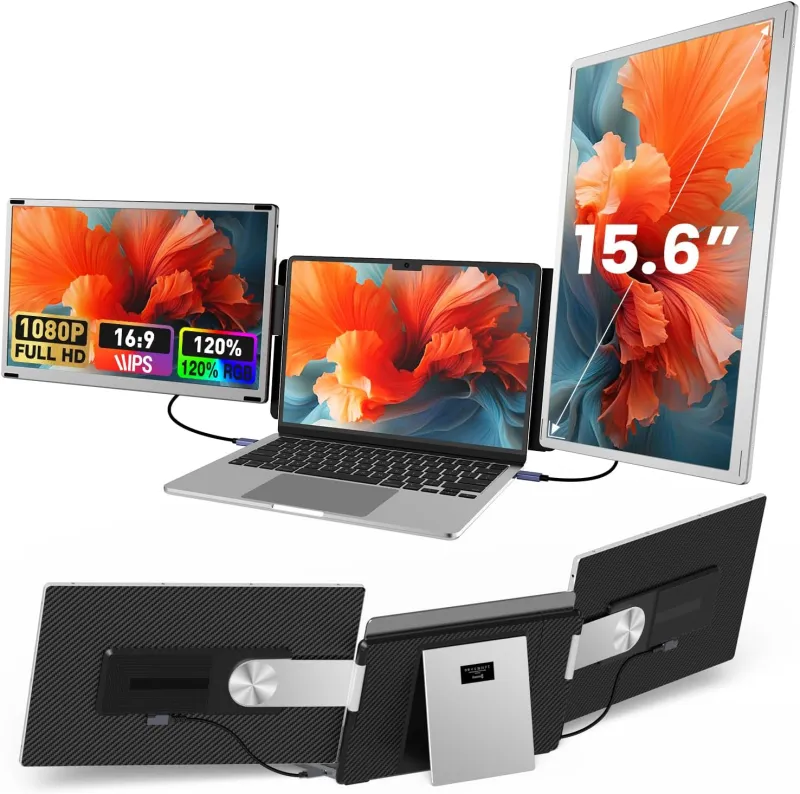 7 product images
15.6″ Laptop Screen Extender, 1080P FHD Laptop Monitor Extender with 120% sRGB, 235°Rotation Detachable Dual Monitor, Plug & Play, Triple Screen Compatible with Windows, Mac, Chrome
Key item features
- 111+ DIY Combination Ideas; Rotatable screen; Stretchable Bracket; Connection method 12Connection method 23Connection method 3Not all laptops can support two expansion screens and make them work well
- Before purchasing this product, please verify whether your laptop port meets one of the above connection options or if there are any product connection problems, please send us the specific model of your laptop and photos of the ports on both sides of the laptop, we will check the compatibility and provide you with a solution.1
- Display "No Signal":Some type-c ports do not support the transmission of video signals
- You need to add an additional HDMI to USB-C cable to connect to the "USB C with DP" port of the screen.2
Price when purchased online
GUARANTEED SAFE CHECKOUT


Shipping information
Standard shipping is $5.95 and free on orders of $39 or more after discounts. Orders ship within 1–3 business days; delivery usually takes 5–15 business days.
View delivery policyReturns & refunds
We accept returns within 30 days of delivery for unused items in their original packaging. Contact us with your order number to start a return.
Read our return policyNeed help?
Our support team answers every message within one business day.
Contact customer support- Maximum 1 item per order. While stocks last.
- 5-year warranty on all products
- Taxes and fees included
- Direct shipping from the US
About this item
111+ DIY Combination Ideas; Rotatable screen; Stretchable Bracket; Connection method 12Connection method 23Connection method 3
Not all laptops can support two expansion screens and make them work well. Before purchasing this product, please verify whether your laptop port meets one of the above connection options or if there are any product connection problems, please send us the specific model of your laptop and photos of the ports on both sides of the laptop, we will check the compatibility and provide you with a solution.
1. Display "No Signal":
Some type-c ports do not support the transmission of video signals. You need to add an additional HDMI to USB-C cable to connect to the "USB C with DP" port of the screen.
2. The screen is black, flickering or enters power saving mode:
It may be that the laptop power or voltage is too low to support 3 screens working at the same time. Please use an additional USB-A to USB-C cable or an external power supply (5V/3A or above) to power the expansion screen.
3. The second screen does not work or for MacOS with M1/M2/M3 chip:
Some laptops do not support the output of two video signals at the same time. Please use the included H5 HUB to connect the "USB C with DP" port of the second screen to the laptop, and then use an additional USB-A to USB-C cable to connect the second screen to the laptop and install the driver.
laptop screen extender
4 connection methods for different laptops
What's in the package?
Warm Tips:
[Enhanced visual experience] This laptop screen extender features 15.6" dual monitor, offering ample space for multitasking and managing multiple applications. With FHD 1080P resolution and upgraded 80% NTSC color gamut, the portable monitor delivers sharper, brighter images and vivid, true-to-life colors. Whether you're tackling complex projects or enjoying entertainment, the expansive screen and superior image quality significantly boost your productivity and visual experience.
[11+ Configurations] Featuring dual monitor that can rotate both horizontally and vertically, this device offers over 11 unique configurations. Whether you need a dual screen setup for multitasking or prefer a single screen for focused tasks, this screen extender can be easily detached or combined to meet your needs-turning your laptop into a dynamic workstation!
[Wide Compatibility] This laptop monitor extender is widely compatible with Windows, MacOS, Chrome and Dex systems. For MacBook with M1, M2 or M3 chips and some laptops with only single screen display due to compatibility issues, please use the included H5 hub to connect the "USB C with DP" port of the second screen, and then use an extra USB-A to USB-C cable to power the "Type C" port of that screen, download the driver as prompted(Driver is required only when using H5 HUB.)
[Innovative Design] This triple screen laptop monitor extender is crafted from durable aluminum alloy and PC materials, ensuring it's robust and heat-resistant. The dual-screen magnetic upgrade design guarantees stability and compactness during installation, allowing you to easily fold it into the included carry bag. Product weight: 5.2 lbs (not lightweight).
[Tips & Service] Not all laptops support two external displays due to hardware or system limitations. If you encounter issues like only one screen working, "no signal", "power saving mode", flickering, or black screen – simply connect the included H5 cable and install the driver. Still stuck? Contact us for expert guidance.
Specifications
Full specifications are listed in the product description above.