 Home & Kitchen
 Electronics
 Tools & Home Improvement
 Patio & Garden
 Toys & Games
 Sports & Outdoors
 Automotive
 Appliances
 Beauty & Personal Care
 Health & Household
 Grocery & Gourmet Food
 Office & School
 9 product images
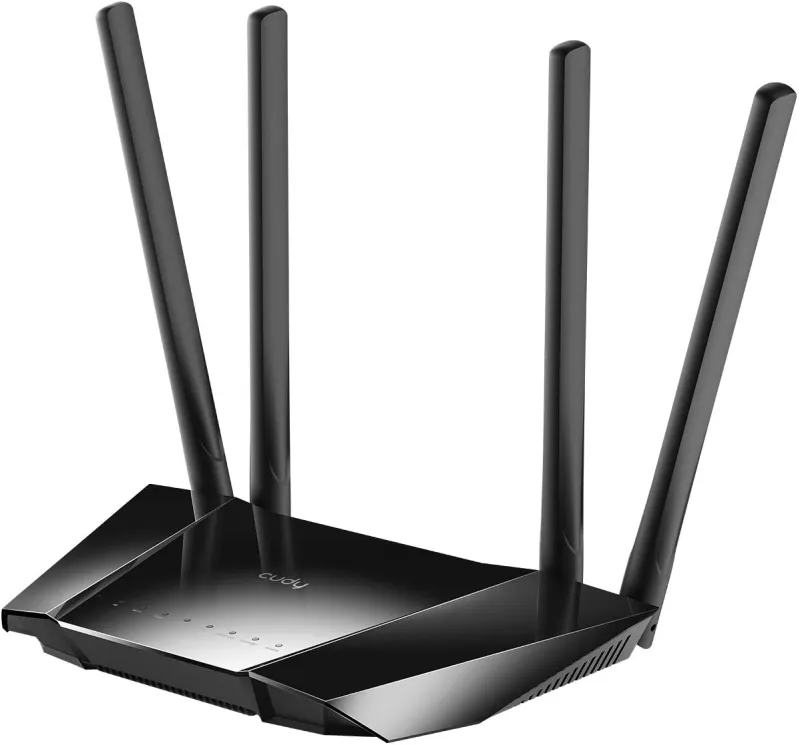
Cudy N300 WiFi Unlocked 4G LTE Modem Router with SIM Card Slot, 300Mbps WiFi, LTE Cat4, EC25-AFX Qualcomm Chipset, 5dBi High Gain Antennas, FDD, DDNS, VPN, Cloudflare, Plug and Play, LT400
Key item features
- Plug in a nano SIM card and connect 4G with a DL speed of anup to 150 Mbps
- Share the connection via a N300 Wi-Fi to up to 32 devices.Share network via four 10/100 Mbps Ethernet ports.Add redundancy to your network, with WAN/WISP/4G connection backup.Set a WiFi schedule and a blacklist of domains or IPs to prevent inappropriate content and protects your kids.Grab your files conveniently from the remote network with ZeroTier/WireGuard/OpenVPN/IPSec/L2TP/PPTP.DDNS binds a domain to your network so you can always access your network without a static IP address.Manage your network from your fingertips.Plug and play easy-to-install WiFi for every home—no rigid broadband subscription is required.Provide decent networks for all devices on your road journey.Make sure the network is always on with the WAN + 4G backup function.Utilized the flexible pay-as-you-go 4G SIM card plan to equip your temporary booth with a fast network
- (SIM card is not included)How to solve if there is no network when plugging in a T-Mobile or AT&T SIM card?Go to Advanced>IPv6 to enable it; Go to Advanced Settings>TTL>Custom and set TTL to 64, HL to 65; Go to General Settings>3G/4G , set APN profile as Manual, set APN as VSBLINTERNET, leave username and password as blank, set authentication as PAP+CHAPHow to acquire the T-Mobile & T-Mobile B2B Static IP?Go to General Settings -> 3G/4G, set Network mode as 4G only, set APN profile as Manual, set APN as fast.t-mobile.com (Note:for static IP plan, set APN as b2b.static ), leave username and password as blank, and set Authentication as PAP+CHAP.What should I do if the issue still exists?Please upgrade the firmware of the LT400 and try again
- Or contact cudy support for help.Turn Everywhere 4G into Wi-Fi for AllWired SharingStay ConnectedEast Setup
Price when purchased online
GUARANTEED SAFE CHECKOUT


Shipping information
Standard shipping is $5.95 and free on orders of $39 or more after discounts. Orders ship within 1–3 business days; delivery usually takes 5–15 business days.
View delivery policyReturns & refunds
We accept returns within 30 days of delivery for unused items in their original packaging. Contact us with your order number to start a return.
Read our return policyNeed help?
Our support team answers every message within one business day.
Contact customer support- Maximum 1 item per order. While stocks last.
- 5-year warranty on all products
- Taxes and fees included
- Direct shipping from the US
About this item
Plug in a nano SIM card and connect 4G with a DL speed of anup to 150 Mbps. Share the connection via a N300 Wi-Fi to up to 32 devices.
Share network via four 10/100 Mbps Ethernet ports.
Add redundancy to your network, with WAN/WISP/4G connection backup.
Set a WiFi schedule and a blacklist of domains or IPs to prevent inappropriate content and protects your kids.
Grab your files conveniently from the remote network with ZeroTier/WireGuard/OpenVPN/IPSec/L2TP/PPTP.
DDNS binds a domain to your network so you can always access your network without a static IP address.
Manage your network from your fingertips.
Plug and play easy-to-install WiFi for every home—no rigid broadband subscription is required.
Provide decent networks for all devices on your road journey.
Make sure the network is always on with the WAN + 4G backup function.
Utilized the flexible pay-as-you-go 4G SIM card plan to equip your temporary booth with a fast network. (SIM card is not included)
How to solve if there is no network when plugging in a T-Mobile or AT&T SIM card?
Go to Advanced>IPv6 to enable it; Go to Advanced Settings>TTL>Custom and set TTL to 64, HL to 65; Go to General Settings>3G/4G , set APN profile as Manual, set APN as VSBLINTERNET, leave username and password as blank, set authentication as PAP+CHAP
How to acquire the T-Mobile & T-Mobile B2B Static IP?
Go to General Settings -> 3G/4G, set Network mode as 4G only, set APN profile as Manual, set APN as fast.t-mobile.com (Note:for static IP plan, set APN as b2b.static ), leave username and password as blank, and set Authentication as PAP+CHAP.
What should I do if the issue still exists?
Please upgrade the firmware of the LT400 and try again. Or contact cudy support for help.
Turn Everywhere 4G into Wi-Fi for All
Wired Sharing
Stay Connected
East Setup. Versatile Functions.
Online Management
VPN
DDNS
Cudy APP
Plug in a SIM Card to Enjoy the Network
Home
Automobile
Surveillance
Booth
Works with Major 4G providers. Insert a SIM card from AT&T, T-Mobile to get download speeds up to 150Mbps. Simply insert a SIM card and get all your Wi-Fi devices connected to the internet, very convenient for places where cable internet is unavailable, such as your holiday cabins or remote cameras. #Note:# This product only work for North America and South America, If you live in European, Africa, Asia, Middle East, please purchase on Amazon European.
High Gain Antennas For Better Performance. The 4 x 5dBi high-gain antennas boost the sensitivity of the router, improve the signal quality of 4G LTE and Wi-Fi, which is conducive to establishing a Wi-Fi connection at a longer distance.
Multiple VPN Clients. With built-in PPTP/L2TP/OpenVPN/WireGuard VPN Client, this 4G router can easily establish a connection to the VPN server to transport all your online data and traffic, securing it with its encryption at the same time. Compatible with 20 more DDNS providers, convenient to manage your remote cameras.
Good Compatibility.Simply insert a BYOD (bring your own device) SIM card and get all your Wi-Fi devices connected to the internet, very convenient for holiday cabins and remote cameras.
Easy and Security. Simply insert the SIM card in the router and type in the PIN in the web configuration page to start exploiting a stable and fast wireless. Provides an easy-to-use graphical management interface, easy to monitor and manage the network. Support DNS Encryption with Cloudflare or NextDNS or google, protect your privacy, prevents eavesdropping and manipulation of DNS data via man-in-the-middle attacks.
Specifications
Full specifications are listed in the product description above.