 Home & Kitchen
 Electronics
 Tools & Home Improvement
 Patio & Garden
 Toys & Games
 Sports & Outdoors
 Automotive
 Appliances
 Beauty & Personal Care
 Health & Household
 Grocery & Gourmet Food
 Office & School
 7 product images
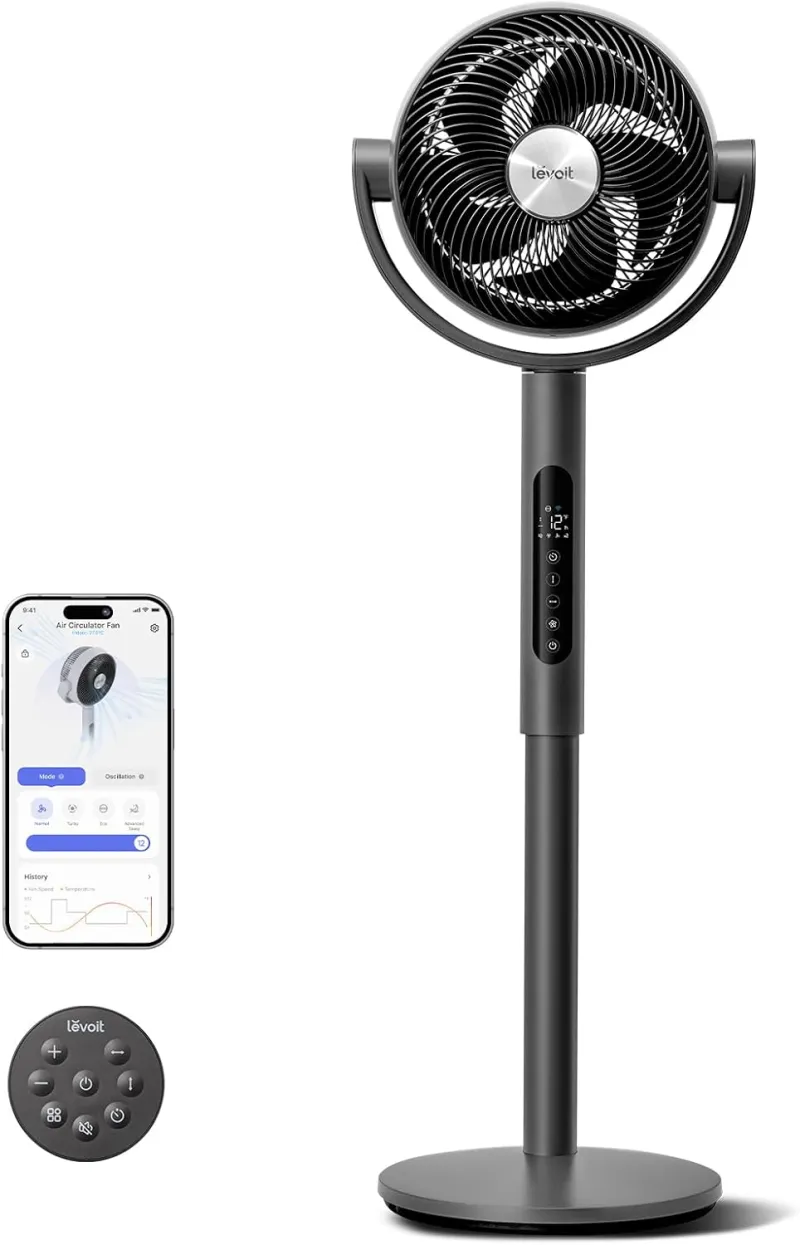
Levoit Standing Fan for Bedroom, 120°+90° Oscillating Fan, 20dB Quiet
Key item features
- Powerful, Even Coolness for Your Whole Family—Your Must-Have for Beating the Heat!1
- Illustration of Each ModeNormal Mode: This is the default mode
- Use it to set the fan speed from 1 (low) to 9 (high) as you like.Use ECO Mode or Sleep Mode for automatic fan speed adjustments according to room temperature.ECO Mode: Use ECO Mode for automatic fan speed adjustments according to the room temperature
- The fan will then operate according to the following logic:a
Price when purchased online
GUARANTEED SAFE CHECKOUT


Shipping information
Standard shipping is $5.95 and free on orders of $39 or more after discounts. Orders ship within 1–3 business days; delivery usually takes 5–15 business days.
View delivery policyReturns & refunds
We accept returns within 30 days of delivery for unused items in their original packaging. Contact us with your order number to start a return.
Read our return policyNeed help?
Our support team answers every message within one business day.
Contact customer support- Maximum 1 item per order. While stocks last.
- 5-year warranty on all products
- Taxes and fees included
- Direct shipping from the US
About this item
Powerful, Even Coolness for Your Whole Family—Your Must-Have for Beating the Heat!
1. Illustration of Each Mode
Normal Mode: This is the default mode. Use it to set the fan speed from 1 (low) to 9 (high) as you like.Use ECO Mode or Sleep Mode for automatic fan speed adjustments according to room temperature.
ECO Mode: Use ECO Mode for automatic fan speed adjustments according to the room temperature. The fan will then operate according to the following logic:
a. If the temperature increases 2°F, the fan speed will increase one level.
b. If the temperature decreases 2°F, the fan speed will decrease one level.
Turbo Mode: Use Turbo Mode with air conditioning to quickly circulate air in your home. The fan automatically starts oscillating and operates at fan speed 9.
Sleep Mode: Sleep Mode is optimized to take into account the stages before you sleep, during sleep, and as you wake up.
a) After 5 seconds, the display will turn off and selection sounds will be disabled.
b) After 1 hour, the fan speed will decrease as the room temperature stabilizes.
c) The fan automatically adjusts the fan speed according to the fluctuating room temperature as you sleep and wake up.
2. Core Parameters
Max CFM: 908
Max Wind Distance: 82ft
Max Wind Speed: 22ft/s
Min Noise Level: 20dB
Horizontal Swing: Automatic 90°
Vertical Swing: Manual 120°
3.Noise Level & Wind Speed:
Low Speed(1-3) : 20-23dB, 8-10ft/s
Medium Speed(4-6) : 37-40dB, 17-19ft/s
High Speed(7-9) : 42-46dB, 20-22ft/s
The Upgraded Smart Solution Pedestal Fan—Circulating Cool Airflow For Large Rooms: Say goodbye to traditional pedestal fans. Levoit Smart Pedestal Air Circulator Fan has a powerful 1,451 CFM airflow. A refreshing breeze to stay cool all day.
Rapid Airflow, Better Than Ever: Don't worry about feeling overheated. With 12 fan speeds, reaching up to 7.5 m/s, Levoit Smart Pedestal Air Circulator Fan delivers the cool air you need quickly. Stay cool and comfortable all day long.
Stay Comfortably Cool In Large Rooms: Cool airflow reaches up to 98 ft, ensuring fresh air circulation throughout your space. Feel the flowing air wherever you are in the room.
Keep Every Corner Cool: Circulate air throughout the entire room. The Levoit Smart Pedestal Air Circulator Fan has adjustable oscillation up to 120° vertical and 90° horizontal. Control fan angles on the the display, controller, or the in the VeSync app.
Experience Quiet Sleep: Turn on Sleep Mode in the VeSync app, with the controller, or on the the display. Create a peaceful night with noise levels as low as 20dB, like the gentle sound of falling leaves.
Hands-Free Control, Anytime: With the help of third-party voice assistants and the VeSync app, you can effortlessly switch modes (Turbo, Normal, Eco and Sleep), set timers up to 24 hours, choose between 12 fan speeds, and adjust oscillation angles.
Note: The fan direction automatically resets to default upon power-on. Use ECO Mode or Sleep Mode for automatic fan speed adjustments according to room temperature.The fan's housing may become warm during use. This is normal and complies with safe temperature standards.
Specifications
Full specifications are listed in the product description above.
Similar items you might like
View all

 -54%
 -87%