 Home & Kitchen
 Electronics
 Tools & Home Improvement
 Patio & Garden
 Toys & Games
 Sports & Outdoors
 Automotive
 Appliances
 Beauty & Personal Care
 Health & Household
 Grocery & Gourmet Food
 Office & School
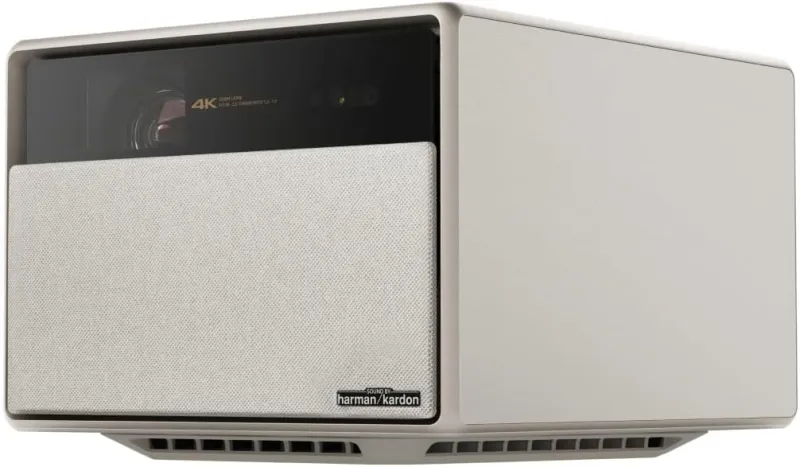 7 product images
XGIMI HORIZON Ultra 4K Projector, Dolby Vision, 2300 ISO Lumens, 2 x 12W Speakers, Home Theater Projector with WiFi and Bluetooth, Dual Light, Active 3D, 200″
Key item features
- Does the XGIMI HORIZON Ultra support automatic keystone correction (vertically and horizontally)?Yes
- The XGIMI HORIZON Ultra supports ±40° auto vertical and horizontal keystone correction for easy setup
- To enable it: go to "Projector Settings" → "Keystone Correction" → "Auto Keystone Correction."Does the XGIMI HORIZON Ultra support screen zoom?Yes
- The screen zoom feature lets you adjust the XGIMI HORIZON Ultra's display size to fit your needs.To enable it: go to "System Setup" → "Projector Settings" → "Keystone Correction" → "Screen Zoom."How do I update the XGIMI HORIZON Ultra firmware?The XGIMI HORIZON Ultra shows firmware update alerts on the homepage
Price when purchased online
GUARANTEED SAFE CHECKOUT


Shipping information
Standard shipping is $5.95 and free on orders of $39 or more after discounts. Orders ship within 1–3 business days; delivery usually takes 5–15 business days.
View delivery policyReturns & refunds
We accept returns within 30 days of delivery for unused items in their original packaging. Contact us with your order number to start a return.
Read our return policyNeed help?
Our support team answers every message within one business day.
Contact customer support- Maximum 1 item per order. While stocks last.
- 5-year warranty on all products
- Taxes and fees included
- Direct shipping from the US
About this item
Does the XGIMI HORIZON Ultra support automatic keystone correction (vertically and horizontally)?
Yes. The XGIMI HORIZON Ultra supports ±40° auto vertical and horizontal keystone correction for easy setup. To enable it: go to "Projector Settings" → "Keystone Correction" → "Auto Keystone Correction."
Does the XGIMI HORIZON Ultra support screen zoom?
Yes. The screen zoom feature lets you adjust the XGIMI HORIZON Ultra's display size to fit your needs.
To enable it: go to "System Setup" → "Projector Settings" → "Keystone Correction" → "Screen Zoom."
How do I update the XGIMI HORIZON Ultra firmware?
The XGIMI HORIZON Ultra shows firmware update alerts on the homepage. Tap "Details" to update. If missed: go to "Settings" → "Device Preferences" → "About" → "System Update" → "Check for update." Keep WiFi stable and don't interrupt the process.
What is the Auto Screen Alignment feature? And how do I use it?
Enable Intelligent Screen Alignment on HORIZON Ultra to auto-adjust to 16:9 or 16:10 screens. Press the remote shortcut for "Keystone Correction," select "Auto Keystone Correction," or use "Manual Keystone Correction" for fine adjustments.
How do I focus manually with the XGIMI HORIZON Ultra?
The XGIMI HORIZON Ultra supports both automatic and manual focus.
For manual focus, long-press the "Focus" button on the XGIMI remote control, then use the "Volume" buttons to adjust the image until it is clear.
4K Projector with Dolby Vision: Thanks to ultra-vivid colors, sharper contrast, and richer details, our smart projector will easily immerse you in the theatrical and unforgettable world of Dolby Vision.
Dual Light Technology: Experience exceptional image quality thanks to an ingenious combination of LED and Laser light sources. With an accurate color accuracy, ultra-high brightness, and a vast color gamut, HORIZON Ultra delivers visuals that are beyond belief.
Bright 2300 ISO Lumens: With an impressive brightness of 2300 ISO lumens, HORIZON Ultra delivers exceptional image quality in any lighting environment, whether you're watching your favorite shows during the day or hosting a movie night under the stars.
New Intelligent Screen Adaption 3.0: Featuring a new era of environmental adaptability, HORIZON Ultra adjusts to wall colors, optimizes screen correction, lossless zoom, and protects your eyes smoother than ever.
Endless Entertainment with Android TV 11.0: Equipped with the latest Android TV 11, enjoy a world of entertainment, from immersive movie marathons to fun-filled gaming adventures, all in the comfort of your own space.
Specifications
Full specifications are listed in the product description above.