 Home & Kitchen
 Electronics
 Tools & Home Improvement
 Patio & Garden
 Toys & Games
 Sports & Outdoors
 Automotive
 Appliances
 Beauty & Personal Care
 Health & Household
 Grocery & Gourmet Food
 Office & School
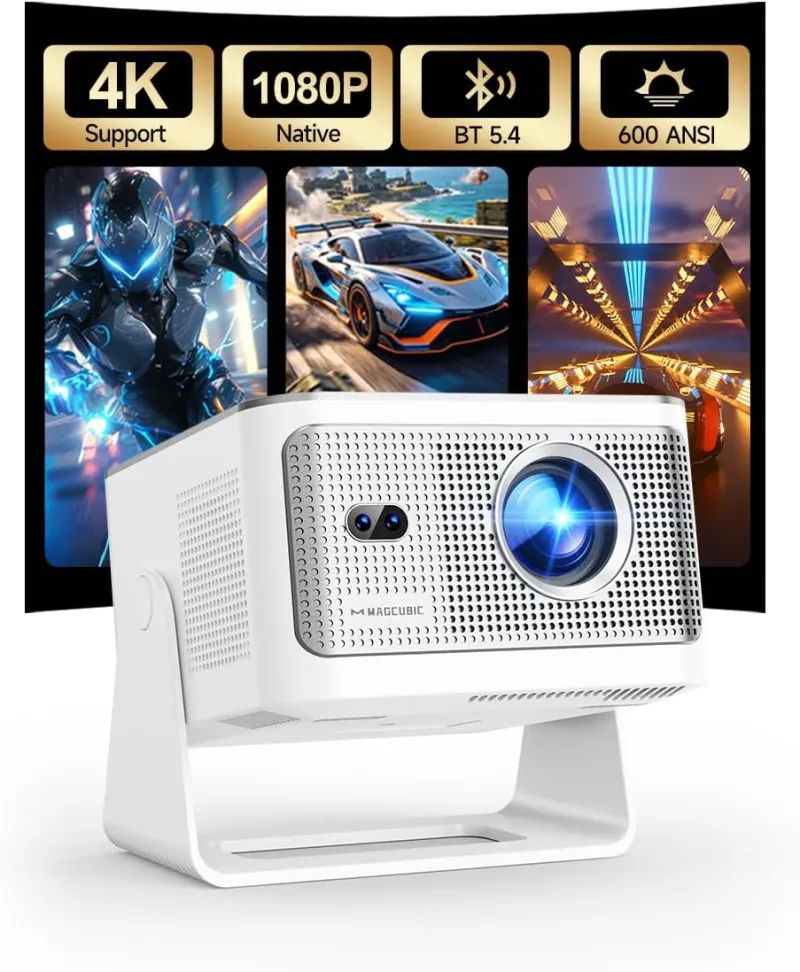 8 product images
Magcubic HY350MAX Mini Projector, 600 ANSI, 4K Support, Auto Focus
Key item features
- Why OTA Update Before Use? To ensure optimal performance and take advantage of our latest features and updates, please upgrade to the most recent software version before first use
- You can do this by navigating to Settings > About device > Online upgrade
- Is It Good for Daytime Use? Due to its brightness limitations, the projector is ideal for dark environments, such as a backyard at night, a campsite after sunset, a living room with closed curtains, or a bedroom with the lights turned off
- Info on Streaming Services Due to the HDCP (High-bandwidth Digital Content Protection) agreement, screen mirroring may not function properly (no image or sound) when attempting to mirror content from certain apps
Price when purchased online
GUARANTEED SAFE CHECKOUT


Shipping information
Standard shipping is $5.95 and free on orders of $39 or more after discounts. Orders ship within 1–3 business days; delivery usually takes 5–15 business days.
View delivery policyReturns & refunds
We accept returns within 30 days of delivery for unused items in their original packaging. Contact us with your order number to start a return.
Read our return policyNeed help?
Our support team answers every message within one business day.
Contact customer support- Maximum 1 item per order. While stocks last.
- 5-year warranty on all products
- Taxes and fees included
- Direct shipping from the US
About this item
Why OTA Update Before Use? To ensure optimal performance and take advantage of our latest features and updates, please upgrade to the most recent software version before first use. You can do this by navigating to Settings > About device > Online upgrade. Is It Good for Daytime Use? Due to its brightness limitations, the projector is ideal for dark environments, such as a backyard at night, a campsite after sunset, a living room with closed curtains, or a bedroom with the lights turned off. Info on Streaming Services Due to the HDCP (High-bandwidth Digital Content Protection) agreement, screen mirroring may not function properly (no image or sound) when attempting to mirror content from certain apps. We recommend that you use a streaming device such as a Amazon Fire Stick or Roku. Activate Manual Focus? If the image appears blurry, use the electronic focus buttons on the remote control to adjust it until the picture becomes sharp. Also, make sure the projector is placed within the correct throw distance range. How to Get a Square Image? Automatic vertical keystone correction works best when the projector lens is directly facing the wall. If the results are unsatisfactory, follow these steps: 1. Place the projector on a flat surface and ensure the lens is perpendicular to the wall. 2. Navigate to Settings > Projection Settings > Keystone Correction > Initial Angle Correction. 3. If needed, disable the automatic keystone correction and make manual adjustments for optimal alignment. Adjust Picture Settings? The projector running Android 14 does not include Display settings for adjusting Contrast, Hue, Saturation, or Sharpness within the Android system interface. To adjust the brightness, go to Settings > Projection Settings > Device Mode and select your preferred mode. However, when using HDMI or USB Drive mode, you can access these picture adjustment options by pressing the "MENU" button on the remote control. Can't Connect to Wi-Fi? 1. Keep the projector and router within 16 feet (5 meters). Check if other devices connect to Wi-Fi. 2. Verify time zone accuracy in Settings > Time and Date > Time Zone. 3. Try a different Wi-Fi network or use your phone's hotspot. 4. Test both 2.4GHz and 5GHz bands on your router. 5. Reset the projector via Settings > Other Settings > Restore Factory Settings. Screen-Mirror iOS? 1. Ensure your device is updated to the latest version. You can do this by navigating to Settings > About device > Online upgrade. 2. Open the ScreenCast app. 3. Use AirPlay on your iOS device, making sure both devices are connected to the same Wi-Fi network. How to Use Air Mouse Remote? Some apps are designed for mobile devices and require the mouse mode to be activated for navigation. Follow these steps to enable the air mouse function: 1. Open the Bluetooth settings on your device. 2. Press and hold both the "Left" and "Right" buttons simultaneously to enter pairing mode. 3. Press the "Mouse" icon on the remote to activate the air mouse function. 4. Move your wrist to control the cursor using the air mouse feature. Unable to Pair BluetoothDevice 1. Update the firmware to the latest version. 2. Clear the Bluetooth records. 3. Restart the projector and try pairing again. 4. Connect another Bluetooth speaker or headset 5. Keep the projector close to the Bluetooth device, avoiding metal objects or walls between them. Note: Miracast and AirPlay use Wi-Fi connections, not Bluetooth. The projector only supports Bluetooth audio output devices (such as speakers or headphones), not phones or other transmitters.OPTICAL CLARITY — Enjoy a bright, detailed big-screen image with 600 ANSI brightness, HDR and 4K support. Powered by the Allwinner H726 chipset, this mini projector delivers clear visuals for movies, gaming and home entertainment.
AUTO SETUP IN SECONDS — Dual front sensors enable Auto Focus, Auto Keystone Correction, Auto Obstacle Avoidance and Auto Screen Alignment, helping keep the image clear, level and properly framed when the projector is moved. With 180° rotation and a smart air-mouse remote, you can also enjoy ceiling projection from bed.
ANDROID 14 SMART PROJECTOR — Access a broad selection of apps through the Android 14 ecosystem and enjoy a large image in compact spaces with a 1.0:1 throw ratio. Ideal for bedrooms, apartments and everyday home entertainment.
ONE-TAP BIG SCREEN & IMMERSIVE SOUND — Enjoy smooth, low-latency screen mirroring with dual-band 2.4G/5G Wi-Fi 6, Bluetooth 5.4, AirPlay and Miracast. HDMI and USB support wired devices, while the built-in 15W high-fidelity speaker delivers immersive sound for movies and music.
CUSTOMER-FIRST SUPPORT — Magcubic is committed to developing optical and acoustic technologies for a better viewing experience. Your satisfaction is our priority, and we provide lifetime customer support. If you encounter any issues, please feel free to contact us. Important Notice: For projection distances over 2.5 m (8.2 ft), use manual focus with the remote control. Always keep the ventilation vents clear to help prevent overheating.
Specifications
Full specifications are listed in the product description above.
Similar items you might like
View all
 -54%

 -65%