 Home & Kitchen
 Electronics
 Tools & Home Improvement
 Patio & Garden
 Toys & Games
 Sports & Outdoors
 Automotive
 Appliances
 Beauty & Personal Care
 Health & Household
 Grocery & Gourmet Food
 Office & School
 9 product images
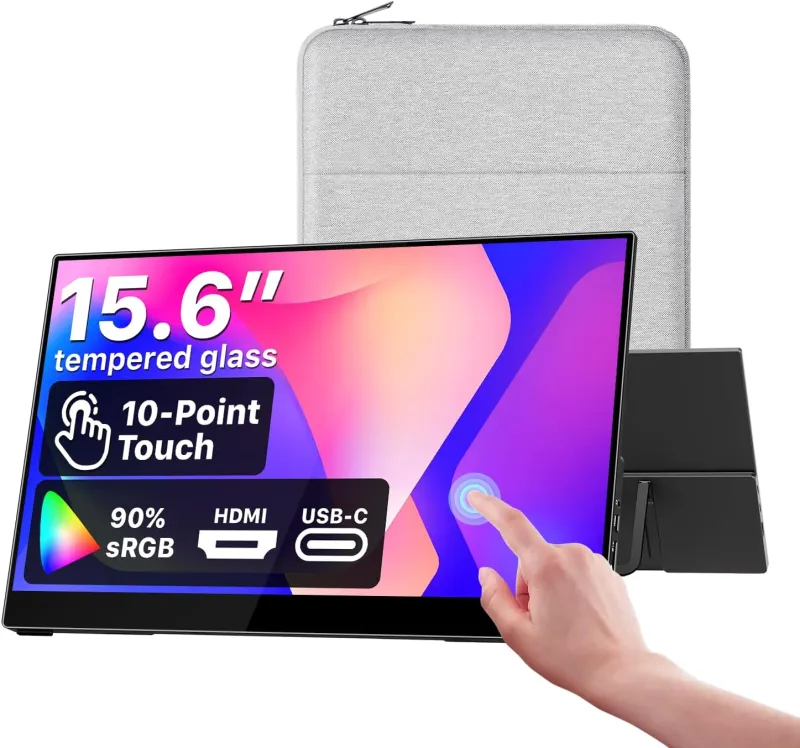
cocopar Portable Monitor Touchscreen 15.6 Inch 1080P FHD 90% sRGB Travel Monitor with Speaker HDMI USB-C Second Screen for Laptop MacBook Surface PC Xbox PS4/5, VESA Mountable, with Touchscreen
Key item features
- Why isn't the touch function working with my HDMI connection?If you use an HDMI or (Mini) DP cable for video, the touch signal requires a separate data connection
- Please also connect the included USB-A to USB-C cable from your computer to the monitor's Type-C port to enable touch functionality.Why is touch unresponsive or inaccurate?Windows: Control Panel > Hardware and Sound > Tablet PC Settings > Set up to map touch.macOS: Allow access if prompted, then move the cursor to the monitor before touching.Note: Touch may be inaccurate in non-16:9 Duplicate mode.Which devices support the touchscreen function?Touch is supported when the monitor is connected to Windows/macOS computers and mini PCs.It's not supported when connected to smartphones, tablets, gaming consoles (PS5, Xbox, Switch), TV sticks, or when using a capacitive stylus pen.What should I do if there is "No Signal" when using a USB-C to USB-C connection?1
- Use the included USB-C to USB-C display cable
- Some cables do not support video.2
Price when purchased online
GUARANTEED SAFE CHECKOUT


Shipping information
Standard shipping is $5.95 and free on orders of $39 or more after discounts. Orders ship within 1–3 business days; delivery usually takes 5–15 business days.
View delivery policyReturns & refunds
We accept returns within 30 days of delivery for unused items in their original packaging. Contact us with your order number to start a return.
Read our return policyNeed help?
Our support team answers every message within one business day.
Contact customer support- Maximum 1 item per order. While stocks last.
- 5-year warranty on all products
- Taxes and fees included
- Direct shipping from the US
About this item
Why isn't the touch function working with my HDMI connection?
If you use an HDMI or (Mini) DP cable for video, the touch signal requires a separate data connection. Please also connect the included USB-A to USB-C cable from your computer to the monitor's Type-C port to enable touch functionality.
Why is touch unresponsive or inaccurate?
Windows: Control Panel > Hardware and Sound > Tablet PC Settings > Set up to map touch.
macOS: Allow access if prompted, then move the cursor to the monitor before touching.
Note: Touch may be inaccurate in non-16:9 Duplicate mode.
Which devices support the touchscreen function?
Touch is supported when the monitor is connected to Windows/macOS computers and mini PCs.
It's not supported when connected to smartphones, tablets, gaming consoles (PS5, Xbox, Switch), TV sticks, or when using a capacitive stylus pen.
What should I do if there is "No Signal" when using a USB-C to USB-C connection?
1. Use the included USB-C to USB-C display cable. Some cables do not support video.
2. Ensure laptop USB-C port supports Thunderbolt/DP Alt Mode.
3. For work laptops, restart first. If blocked by security settings, contact your IT for permission.
What should I do if the monitor flickers, looks dim, or appears blurry?
Flickering: Use the included power adapter to provide sufficient power.
Dim or blurry: Reset the monitor in the OSD menu, then increase the brightness and adjust the resolution as needed.
Tap, long-press, scroll, drag, zoom, and swipe. Boost your workflow efficiency
Ultimate Multiple Touch Experience
Quick guide to calibrate the touch display on Windows
Perfect Match for Windows: Easy Calibration
No setup needed: move the cursor to start touching
Perfect Match for macOS: Easy Calibration
Why isn't the touch function working with my HDMI connection?
Why is touch unresponsive or inaccurate?
Which devices support the touchscreen function?
What should I do if there is "No Signal" when using a USB-C to USB-C connection?
What should I do if the monitor flickers, looks dim, or appears blurry?
Native touch gestures for macOS and Windows: Unlock the full potential of your OS with this advanced touchscreen portable monitor. Unlike generic screens that restrict Mac users to single clicks, cocopar delivers universal compatibility. Navigate intuitively with single-finger slide, pinch-to-zoom, drag and drop on both Windows and macOS, transforming your device into a high-efficiency external touchscreen workstation.
Durable tempered glass portable screen with silky touch: Upgrade from the poor feel of plastic-film screens to a premium experience. This travel monitor features a high-hardness tempered glass surface for exceptional scratch resistance. It ensures a silky-smooth touch response that is faster and easier to clean, providing a high-end tactile feel that stays pristine through years of daily use as a second screen.
Effortless one-cable USB-C monitor and laptop extender: Streamline your desk with true plug-and-play simplicity. A single USB-C cable handles power, video, and touch signals, instantly acting as a portable monitor for laptop expansion. No drivers needed. (Note: Computer must support Thunderbolt 3/4/5 or USB-C DP Alt Mode for single-cable function).
Vivid 15.6" FHD IPS computer monitor: See every detail on this A-grade IPS panel featuring 1920x1080 resolution and 90% sRGB wide color gamut. With 270 nits of brightness and 178° viewing angles, this external display delivers consistent, professional visuals. Equipped with dual USB-C and a standard HDMI port, it serves as a versatile gaming screen (non-touch) or office display.
Metal build with kickstand and complete kit: Built for durability, this monitor portable solution is encased in a sturdy metal frame for heat dissipation. The integrated adjustable kickstand provides stable support at any angle. The package includes a protective sleeve, power adapter, and all necessary cables (HDMI & USB-C), making it the perfect dual monitor setup ready to use right out of the box.
Specifications
Full specifications are listed in the product description above.