 Home & Kitchen
 Electronics
 Tools & Home Improvement
 Patio & Garden
 Toys & Games
 Sports & Outdoors
 Automotive
 Appliances
 Beauty & Personal Care
 Health & Household
 Grocery & Gourmet Food
 Office & School
 9 product images
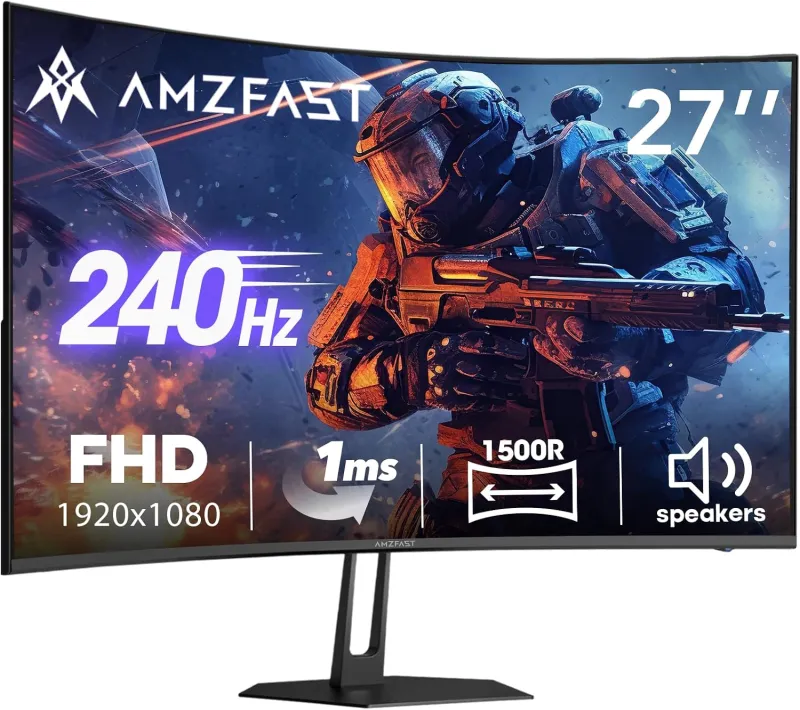
Amzfast 27 inch 240Hz Curved Monitor, FHD 1080p Gaming Monitor, Built-in Speakers, FreeSync, MPRT 1ms, 130% sRGB, 4000:1, 1500R, VESA Mount, HDMI 2.0&DP 1.4, 12 Months Warranty, AMZG27C1 Pro
Key item features
- How to Achieve the Maximum Refresh Rate? Follow the three steps below carefully or contact for support.1.Connect the video signal port on your computer's graphics card (not the one on the motherboard) using an HDMI or DP cable.2.System refresh rate setting3.Graphics control panel adjustmentAbout system refresh rate settingRight-click on desktop → Display settings → Advanced display → Under "Refresh rate", select the highest value (e.g
- 144Hz / 165Hz / 240Hz).About graphics control panel adjustment (if no high refresh rate option in step 2)1.Update your graphics driver to the latest version.2.Open NVIDIA Control Panel or AMD Software → "Change resolution" → Select the resolution under the 「PC」section (avoid "Ultra HD, HD, SD") → then choose the high refresh rate.About Multi-monitor mode checkIf using multiple monitors, avoid "Clone mode" (Duplicate)
- Change to 「Extend mode」; otherwise the refresh rate may be limited to the lowest common value.How to Achieve the Maximum Refresh Rate? Follow the three steps below carefully or contact for support.About system refresh rate settingAbout graphics control panel adjustment (if no high refresh rate option in step 2)About Multi-monitor mode check27'' 240Hz FHD 1080p Gaming Monitor for GamePlayBuilt-in Speakers: Built-in two upgraded 2w speakers, compared with the speakers on the market, the sound quality has been upgraded and the sound experience is better.Pro Gaming Features: Optimized with FPS/RTS/RPG game modes, Crosshair assistance and Black level adjustment for enhanced visibility, Adaptive-Sync for seamless performance.Visuals: 16.7 million colors (8-bit), 130% sRGB, HDR 10 ,300 Nits brightness and 4000:1 contrast ratio | Anti-flicker;Anti-Glare;Low Blue Light - perfect for designers, gamers, and officers.Configuration: HDMI 2.0 & DP 1.4 * 1, VESA 100mm *100mm support ,video signal cable *1 included in package.
Price when purchased online
GUARANTEED SAFE CHECKOUT


Shipping information
Standard shipping is $5.95 and free on orders of $39 or more after discounts. Orders ship within 1–3 business days; delivery usually takes 5–15 business days.
View delivery policyReturns & refunds
We accept returns within 30 days of delivery for unused items in their original packaging. Contact us with your order number to start a return.
Read our return policyNeed help?
Our support team answers every message within one business day.
Contact customer support- Maximum 1 item per order. While stocks last.
- 5-year warranty on all products
- Taxes and fees included
- Direct shipping from the US
About this item
How to Achieve the Maximum Refresh Rate? Follow the three steps below carefully or contact for support.
1.Connect the video signal port on your computer's graphics card (not the one on the motherboard) using an HDMI or DP cable.
2.System refresh rate setting
3.Graphics control panel adjustment
About system refresh rate setting
Right-click on desktop → Display settings → Advanced display → Under "Refresh rate", select the highest value (e.g. 144Hz / 165Hz / 240Hz).
About graphics control panel adjustment (if no high refresh rate option in step 2)
1.Update your graphics driver to the latest version.
2.Open NVIDIA Control Panel or AMD Software → "Change resolution" → Select the resolution under the 「PC」section (avoid "Ultra HD, HD, SD") → then choose the high refresh rate.
About Multi-monitor mode check
If using multiple monitors, avoid "Clone mode" (Duplicate). Change to 「Extend mode」; otherwise the refresh rate may be limited to the lowest common value.
How to Achieve the Maximum Refresh Rate? Follow the three steps below carefully or contact for support.
About system refresh rate setting
About graphics control panel adjustment (if no high refresh rate option in step 2)
About Multi-monitor mode check
27'' 240Hz FHD 1080p Gaming Monitor for GamePlay
Built-in Speakers: Built-in two upgraded 2w speakers, compared with the speakers on the market, the sound quality has been upgraded and the sound experience is better.
Pro Gaming Features: Optimized with FPS/RTS/RPG game modes, Crosshair assistance and Black level adjustment for enhanced visibility, Adaptive-Sync for seamless performance.
Visuals: 16.7 million colors (8-bit), 130% sRGB, HDR 10 ,300 Nits brightness and 4000:1 contrast ratio | Anti-flicker;Anti-Glare;Low Blue Light - perfect for designers, gamers, and officers.
Configuration: HDMI 2.0 & DP 1.4 * 1, VESA 100mm *100mm support ,video signal cable *1 included in package.
Specifications
Full specifications are listed in the product description above.
Similar items you might like
View all

 -98%


 -97%