 Home & Kitchen
 Electronics
 Tools & Home Improvement
 Patio & Garden
 Toys & Games
 Sports & Outdoors
 Automotive
 Appliances
 Beauty & Personal Care
 Health & Household
 Grocery & Gourmet Food
 Office & School
 8 product images
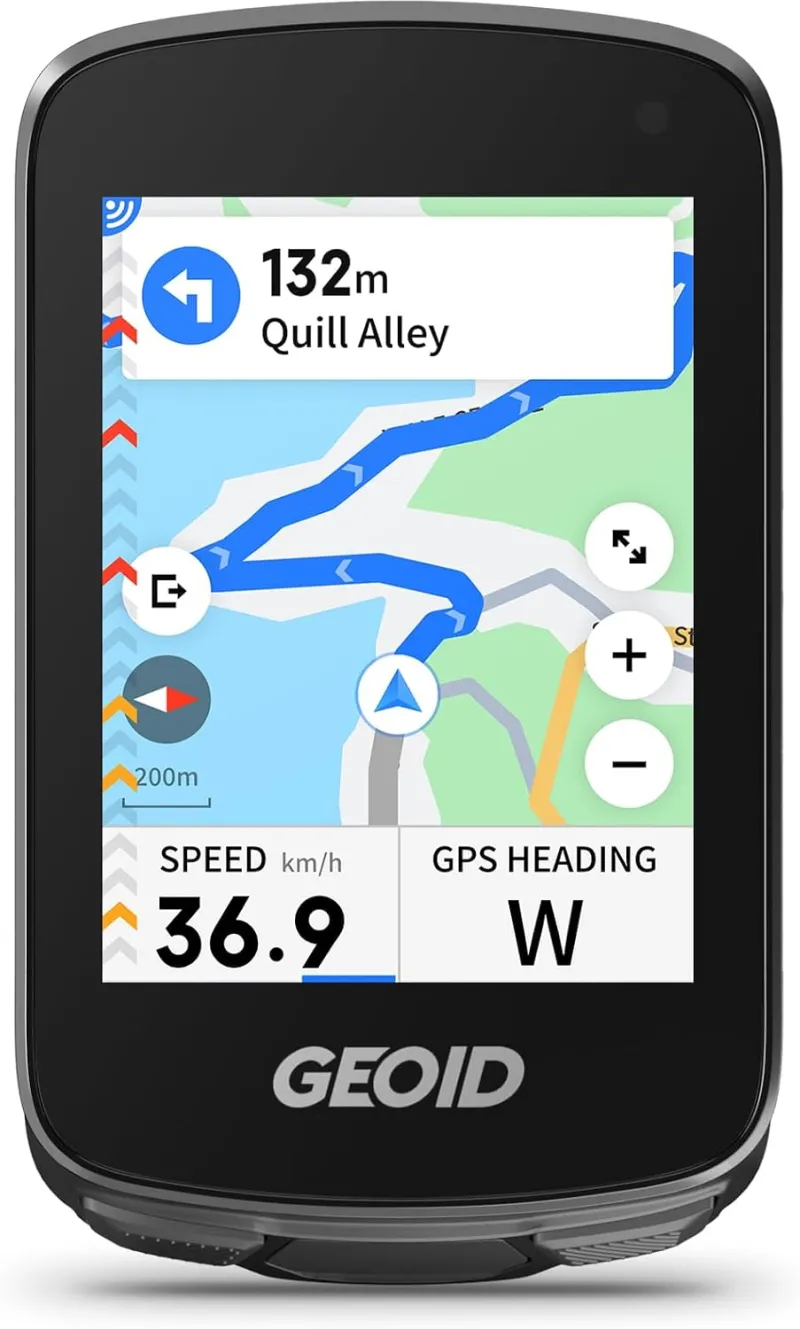
GEOID CC700 Pro 2.8″ Color Touchscreen GPS Bike/Cycling Computer, Map Navigation with Re-Route Planning, WiFi Auto-Sync, ANT+/Bluetooth, Message Notification, IPX7 Waterproof, Free Indoor Training
Key item features
- Fast Positioning; Auto Resume31000km Route Support; IPX7 Waterproof; Wide Device Compatibility; Connect to DJI; WiFi Auto-Sync; Indoor Training; Global Data Types; Analyze & Share; Replacement Mount; Message Notification; Personalized Layout; Package Contents Screen Size 2.8 inch Screen Type Touchscreen Navigation Type Map Navigation Storage Space ; GB Wireless Protocol Bluetooth, ANT+, Wi-Fi Map Zoom Click, Auto Battery Life 15h-25h Single Navigation Route Length 1000km Weight 104g Removable Mount ✓ Street Name Display at Turns ✓ Reroute ✓ Turn Alert ✓ Navigation View Adjustment ✓ Smart Trainer Training ✓Why is the map stuck on the loading screen, and how can I fix it?This can be caused by network connection issues
- As a quick fix, long-press the Power button until the power options menu appears, then return to the Map Download page and try again
- The download will proceed normally.How do I switch between Metric (km/h) and Imperial (mph, miles, lbs) units?**Bike computer and App units are independent and do not sync.Computer: Settings → Preferences Settings → Unit Preferences (mph/miles)App: Me → Settings(top-right icon) → Unit Preferences (lbs, ft/in)How do I activate the device and handle app permissions during setup? What is the first step?Download the OnelapFit App first and use the in-app QR scanner to pair
- Bluetooth and Location permissions are strictly used to connect your device and sync satellite data safely, fully respecting your privacy.Why isn't rerouting/off-course route planning working?Rerouting requires a continuous connection between the OnelapFit App and the bike computer
Price when purchased online
GUARANTEED SAFE CHECKOUT


Shipping information
Standard shipping is $5.95 and free on orders of $39 or more after discounts. Orders ship within 1–3 business days; delivery usually takes 5–15 business days.
View delivery policyReturns & refunds
We accept returns within 30 days of delivery for unused items in their original packaging. Contact us with your order number to start a return.
Read our return policyNeed help?
Our support team answers every message within one business day.
Contact customer support- Maximum 1 item per order. While stocks last.
- 5-year warranty on all products
- Taxes and fees included
- Direct shipping from the US
About this item
Fast Positioning; Auto Resume31000km Route Support; IPX7 Waterproof; Wide Device Compatibility; Connect to DJI; WiFi Auto-Sync; Indoor Training; Global Data Types; Analyze & Share; Replacement Mount; Message Notification; Personalized Layout; Package Contents Screen Size 2.8 inch Screen Type Touchscreen Navigation Type Map Navigation Storage Space ; GB Wireless Protocol Bluetooth, ANT+, Wi-Fi Map Zoom Click, Auto Battery Life 15h-25h Single Navigation Route Length 1000km Weight 104g Removable Mount ✓ Street Name Display at Turns ✓ Reroute ✓ Turn Alert ✓ Navigation View Adjustment ✓ Smart Trainer Training ✓
Why is the map stuck on the loading screen, and how can I fix it?
This can be caused by network connection issues. As a quick fix, long-press the Power button until the power options menu appears, then return to the Map Download page and try again. The download will proceed normally.
How do I switch between Metric (km/h) and Imperial (mph, miles, lbs) units?
**Bike computer and App units are independent and do not sync.
Computer: Settings → Preferences Settings → Unit Preferences (mph/miles)
App: Me → Settings(top-right icon) → Unit Preferences (lbs, ft/in)
How do I activate the device and handle app permissions during setup? What is the first step?
Download the OnelapFit App first and use the in-app QR scanner to pair. Bluetooth and Location permissions are strictly used to connect your device and sync satellite data safely, fully respecting your privacy.
Why isn't rerouting/off-course route planning working?
Rerouting requires a continuous connection between the OnelapFit App and the bike computer. Please ensure the App stays connected via Bluetooth during your ride to allow real-time route calculation when off-course.
GEOID CC700Pro 2.8'' Touchscreen GPS Bike Computer
2.8" Large Touchscreen: A Vivid Screen for a Vivid Ride. The 2.8-inch color screen provides clear navigation, empowering you to confidently explore new horizons. The touchscreen and 3 buttons enable faster operation and safer, more focused riding.
Smart Map Navigation: CC700 Pro supports global offline downloads with 4GB storage for multiple routes. Its color-coded maps—featuring turn prompts, street names, map zoom, and dual-perspective views—make navigation effortless to follow.
Re-Route Planning: Off Route? Forge Ahead. Our route navigation instantly recalculates your path, allowing you to keep moving forward without turning back. (This feature is enabled when your bike computer remains connected to the designated app.)
5 Satellites & AGNSS, 5-Second Positioning: Supports GPS, BEIDOU, GLONASS, QZSS, and GALILEO. Connect to WiFi and sync AGNSS for 5-second location acquisition. AGNSS data valid for 14 days. Ensure latest AGNSS data is synced, CC700 Pro is powered on/off near the same location, and the area is open
WiFi & Bluetooth Transmission: Automatically sync AGNSS and riding records, update firmware directly on the bike computer, and enjoy seamless, rapid transfers that let you focus on your ride. WiFi offers significantly improved speeds over Bluetooth
Portable Data Export: Easily export and share FIT files via the specified App. Compatible with STRAVA and TrainingPeaks for auto-sync of cycling data after account binding
Free Indoor Training to Enhance Your Power Performance: The CC700 Pro supports indoor training with a smart trainer, allowing you to customize power targets, resistance levels, and gradients. Focus entirely on improving your performance without external factors like weather or road conditions affecting your training pace
Support for 11 Languages: Choose from a selection of languages including English, Italian, Japanese, Spanish, Korean, Portuguese, German, French, Polish, Traditional Chinese, and Russian
Connect to DJI: After connecting to a DJI action camera, the cycling page automatically adds a control dial UI, which allows you to switch between modes and start/stop recording.(Compatible only with DJI Action 4 and Action 5 Pro)
Specifications
Full specifications are listed in the product description above.