 Home & Kitchen
 Electronics
 Tools & Home Improvement
 Patio & Garden
 Toys & Games
 Sports & Outdoors
 Automotive
 Appliances
 Beauty & Personal Care
 Health & Household
 Grocery & Gourmet Food
 Office & School
 8 product images
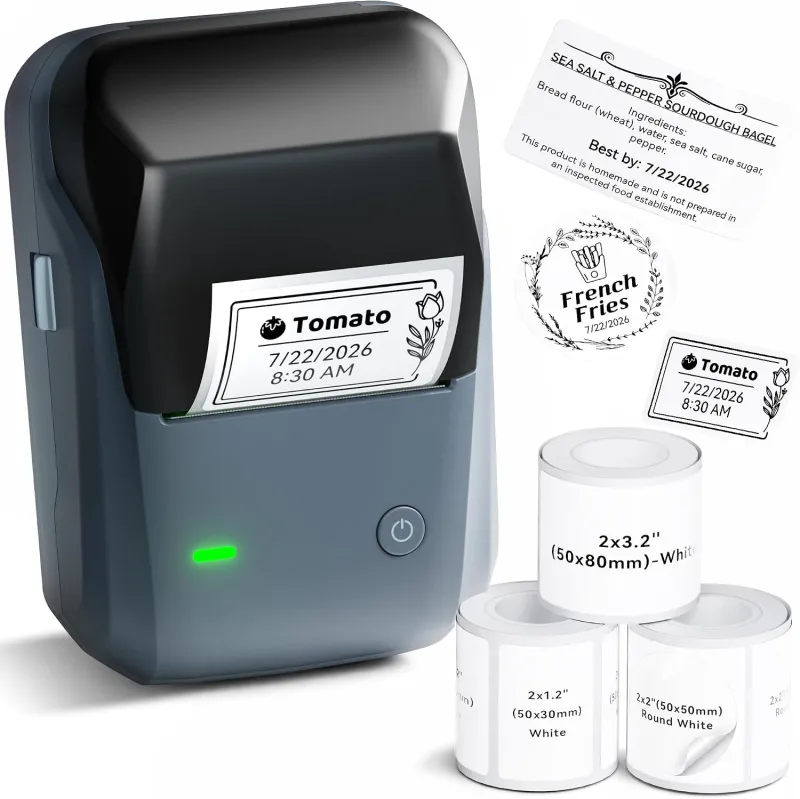
NIIMBOT B1 Label Maker Came with 3 Rolls of White Labels(Blue)
Key item features
- Various Style Labels; Print 1''-2'' Width Label; Print with Phone; Print with PCHow to set up B1 label maker to connect Bluetooth?1
- Connecting Bluetooth via "NIIMBOT" APP.2
- Download the App "NIIMBOT" from the Apple Store/Google Play.3
- Turn on Bluetooth on your phone, long press to turn on the B1 label printer, and open the "NIIMBOT" app to link to Bluetooth.What system does B1 label maker support?This label maker compatible with both Phone (iOS & Android) and Computer (Windows7&10)How to set up B1 label printe on computer via USB cable?1
Price when purchased online
GUARANTEED SAFE CHECKOUT


Shipping information
Standard shipping is $5.95 and free on orders of $39 or more after discounts. Orders ship within 1–3 business days; delivery usually takes 5–15 business days.
View delivery policyReturns & refunds
We accept returns within 30 days of delivery for unused items in their original packaging. Contact us with your order number to start a return.
Read our return policyNeed help?
Our support team answers every message within one business day.
Contact customer support- Maximum 1 item per order. While stocks last.
- 5-year warranty on all products
- Taxes and fees included
- Direct shipping from the US
About this item
Various Style Labels; Print 1''-2'' Width Label; Print with Phone; Print with PC
How to set up B1 label maker to connect Bluetooth?
1. Connecting Bluetooth via "NIIMBOT" APP.
2. Download the App "NIIMBOT" from the Apple Store/Google Play.
3. Turn on Bluetooth on your phone, long press to turn on the B1 label printer, and open the "NIIMBOT" app to link to Bluetooth.
What system does B1 label maker support?
This label maker compatible with both Phone (iOS & Android) and Computer (Windows7&10)
How to set up B1 label printe on computer via USB cable?
1. Before installation, power on printer and connect it to computer via USB cable.
2. Visit "niimbot.com" Install the "NIIMBOT" application, then open the desktop version APP
3.There is a detailed video on the product details page, please watch it.
Notice: What can you do if the printing is not clear?
1. Connect B1 through Bluethooth on APP "Labelnize".
2. Click on "Me- "My device"-"Firmware version" -and update to 3.02 immediately.
3. The printer emits a "beep" sound, indicating that the firmware upgrade is successful.
Can I use other brands' labels with this machine?
Our printing system utilizes patented label detection technology that only recognizes authentic NIIMBOT labels. Third-party labels lack the required RFID, for optimal performance, always use genuine NIIMBOT labels (sold separately)
NIIMBOT B1 Label Maker Machine with Tape for Your Small Business
NIIMBOT Label Maker for Home Organization Office Business
File Folder Labels
Baking Labels
NIIMBOT Labels for Home Organization
Cable Labels for Cable Management
【You Will Get】B1 label maker +3 rolls label paper, 50x30mm white label/50x80mm white label /50x50 round white label, the 50x30mm white label paper is in the paper bin of the label machine. Please open the label printer to check
【Easy to Use】The B1 bluetooth label printer support iOS, Android. Download the "NIIMBOT"app, select the printer model B1 from the app, and connect printer. USB cable connection for PC, need to download driver form Niimbot brand official website, please see the details page video description
【Powerful APP】More than 30 fonts and languages, 100 borders, and 1500 symbols were supported by the app. Auto-identify the size of the label sticker, no need to manually select the template, complete the printing in time and quickly
【Widely Use】 It is made of high-quality ABS and has a good appearance. B1 label maker machine with tape, 2 x 1.18 inch labels/roll. Small business, school, office, retail establishments, apparel, jewelry, and home organization can all use it
【Compatibility】Not suggested for use with Pad, incompatible with Pad. Get in touch with us if your Bluetooth label maker is too broken to fix or won't start at all
Specifications
Full specifications are listed in the product description above.